Industry: stickers
A designer for sticker shops
Most of the work with stickers is the cut line. The designer makes it by itself: from an element outline in a photo, from a library shape or from your own PNG. You get the print file and a separate CutContour file for the plotter.
- Shapes
- Contour, circle, rectangle, heart, star, your own PNG
- Modes
- Single, sheet, arranged sheet, roll
- Cut line
- CutContour file, check for areas < 1 mm
- Outline from a photo
- Edges, background colour or AI, brush fixes
A sticker sheet from one photo
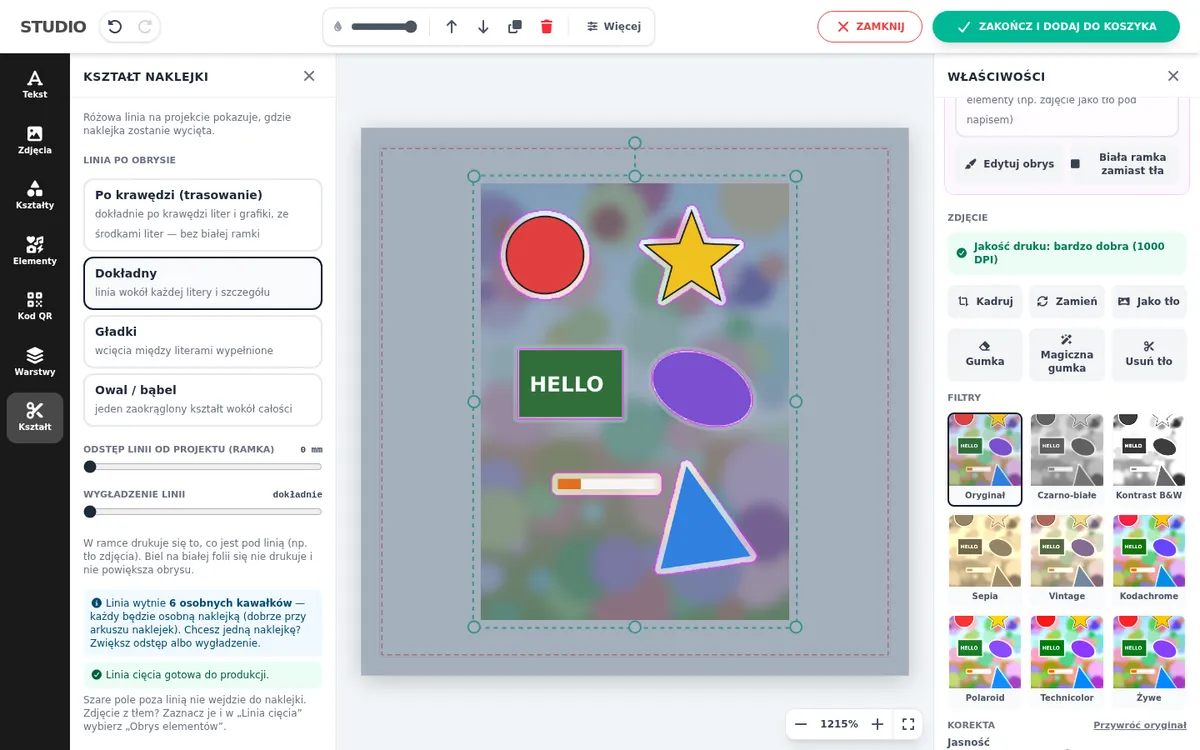
The customer uploads a photo of several characters on one background. “Element outline” detects each of them and adds a white border. Detection thresholds are set with sliders, and edges are fixed with a brush. The line check shows the number of stickers and places narrower than 1 mm that the plotter will not cut cleanly.
A file for the plotter
The order gets the print file and a separate PDF with the cut line in the CutContour colour. The plotter software recognises the line as a cutting path. Full description on the sticker designer page.
Frequently asked questions
How far is the cut line from the graphic?
You set it in the template, e.g. 2 mm. The designer draws the line at that distance from the outline and smooths it.
Can the customer choose the sticker shape?
Yes, when you add several shapes to the template. The buyer picks them in the Shape tab, and a pink line shows the cut.
Does it work with IdoSell parameters?
Yes, the shape, diameter and quantity can come from product parameters in IdoSell.
See also
Try the designer on your own products
30 days free, no card and no automatic payments. Standard costs 58 EUR net per month, Premium 80 EUR. One shop and one order system are included.