Print shops
Banners, posters, flyers, stickers and signs: the customer designs at the product size with bleed, and you get a file that fits your printer and plotter — no fixing in graphics software and no e-mail ping-pong.
A simple, intuitive designer on your shop's product page — any customer can use it, no design skills needed. The customer adds text and photos or starts from a ready-made template, and the order comes with a print-ready file: a vector PDF in millimetres with bleed or a PNG with transparency. Also selling on Allegro, Amazon, in WooCommerce, PrestaShop or Shoper? After the order, the designer sends the customer a link to design the product automatically.
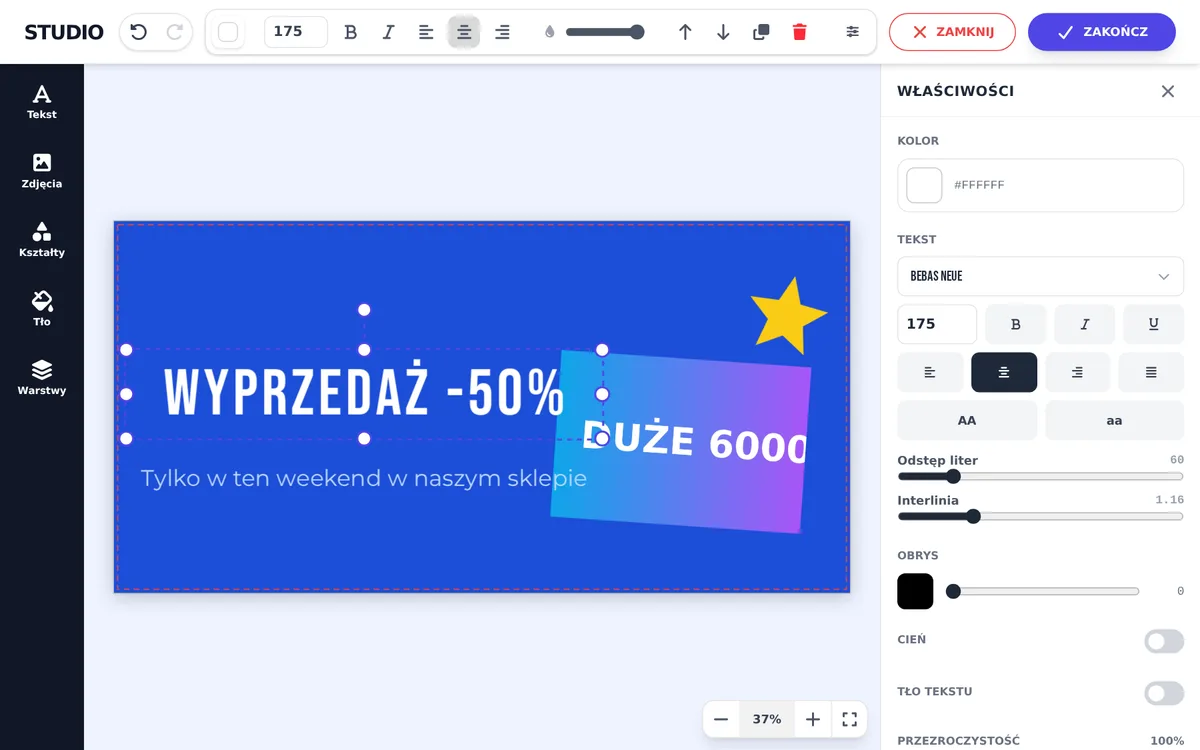
project_banner.pdf
2020 × 1020 mm · vector · with bleed
One tool for print shops, agencies and apparel personalization businesses: the customer prepares a print-ready file, an order from any channel goes straight to production, and you take it all the way to shipping.
The designer on the product page or from a link after the purchase — text, photos, ready-made templates, AI, a T-shirt mockup with front, back and sleeve.
IdoSell, WooCommerce, PrestaShop, Shoper, Allegro, Amazon, Empik — also via Base.com or Apilo. The design links itself to the order.
A vector PDF in mm with bleed, a 300 DPI PNG for garment printing, a CutContour cut file, DPI check, and TIFF / CMYK in Premium.
Statuses (To print, Printing, Shipped), customer corrections, ZIP packages named after orders, and the status going back to the order.
Banners, posters, flyers, stickers and signs: the customer designs at the product size with bleed, and you get a file that fits your printer and plotter — no fixing in graphics software and no e-mail ping-pong.
Ready-made templates for clients, personal designer links after a phone call, review and correction requests in one click — and the designer on your own domain (white label).
The design on a photo of a T-shirt, hoodie or mug (front, back, sleeve, colour from the product option), and for printing just the artwork as a 300 DPI PNG with transparency — also for orders from Allegro and Amazon.
From the customer's design to a file in production — no more e-mailed files and fixing them in graphics software.
The customer picks an option in your shop and the designer adapts: a size from the list (A4, B3, “Small”) opens the design at its own dimensions, a T-shirt colour shows the right photo and a flag style gets its own shape. Sizes are recognised from option names, and every photo has its own print area (e.g. a sleeve smaller than the front).
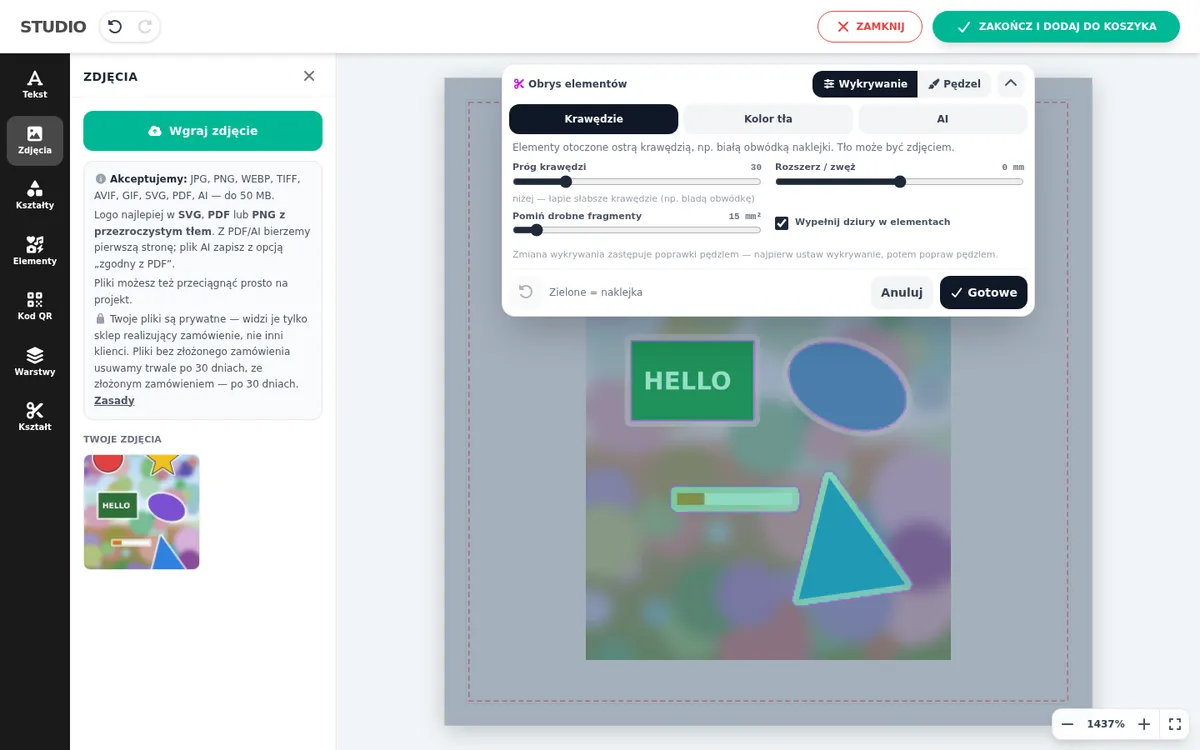
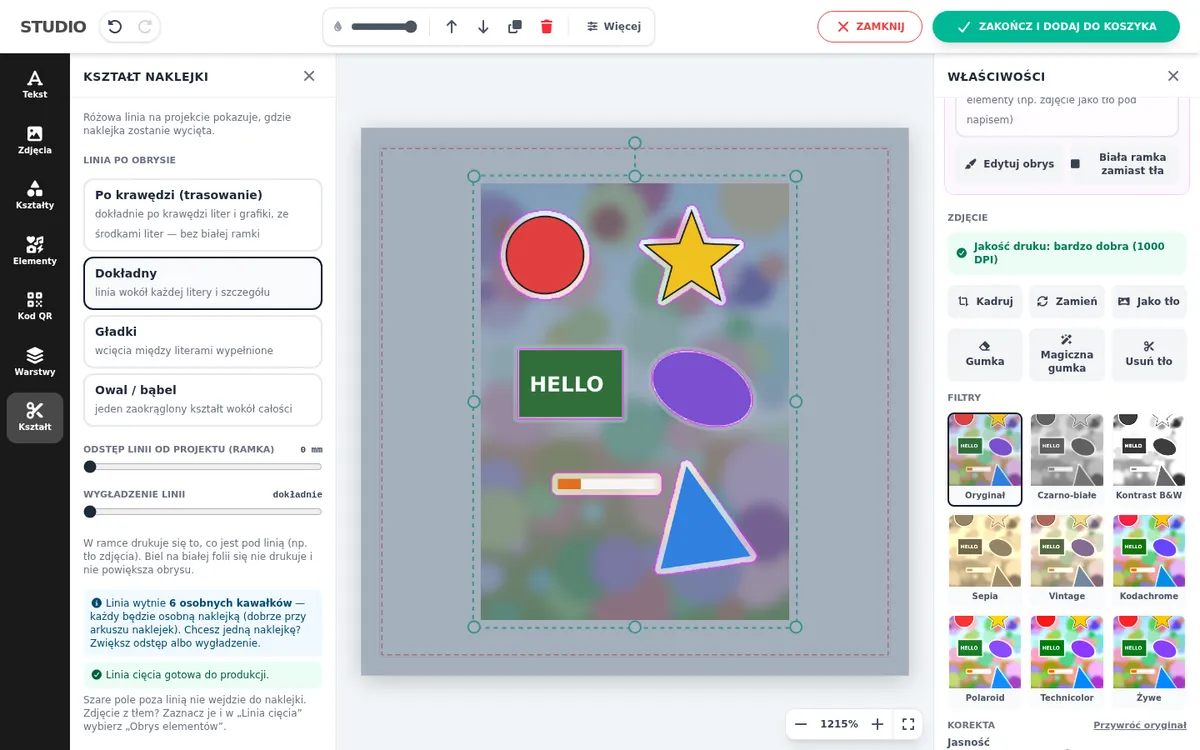
“Element outline” cuts characters, lettering or a whole sticker sheet with a white border out of a single photo — the background stays in the print. Edge, background-colour or AI detection with slider thresholds, brush touch-ups, line offset and smoothing. The designer warns about parts narrower than 1 mm, and you get a CutContour cut file.
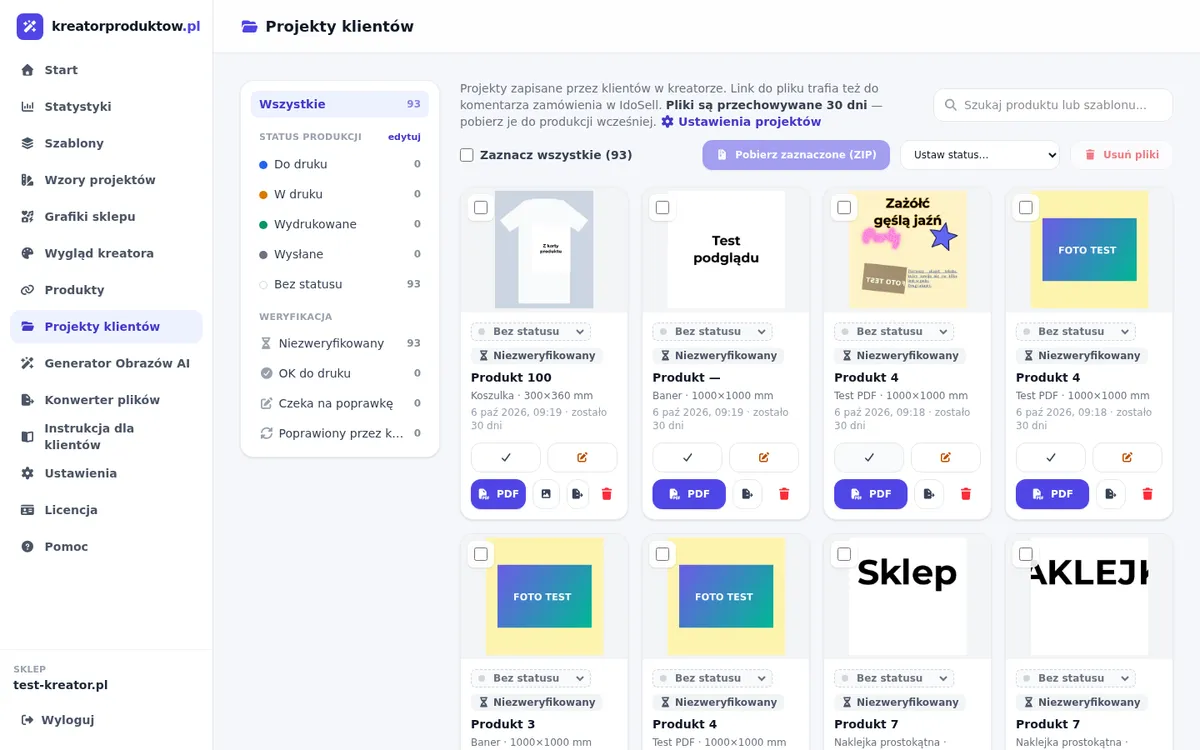
Customer projects with IdoSell order numbers, your own production statuses (To print, Printing, Shipped…) with counters, filters, bulk ZIP download named after orders, a “Downloaded” marker against double printing, and order statistics.
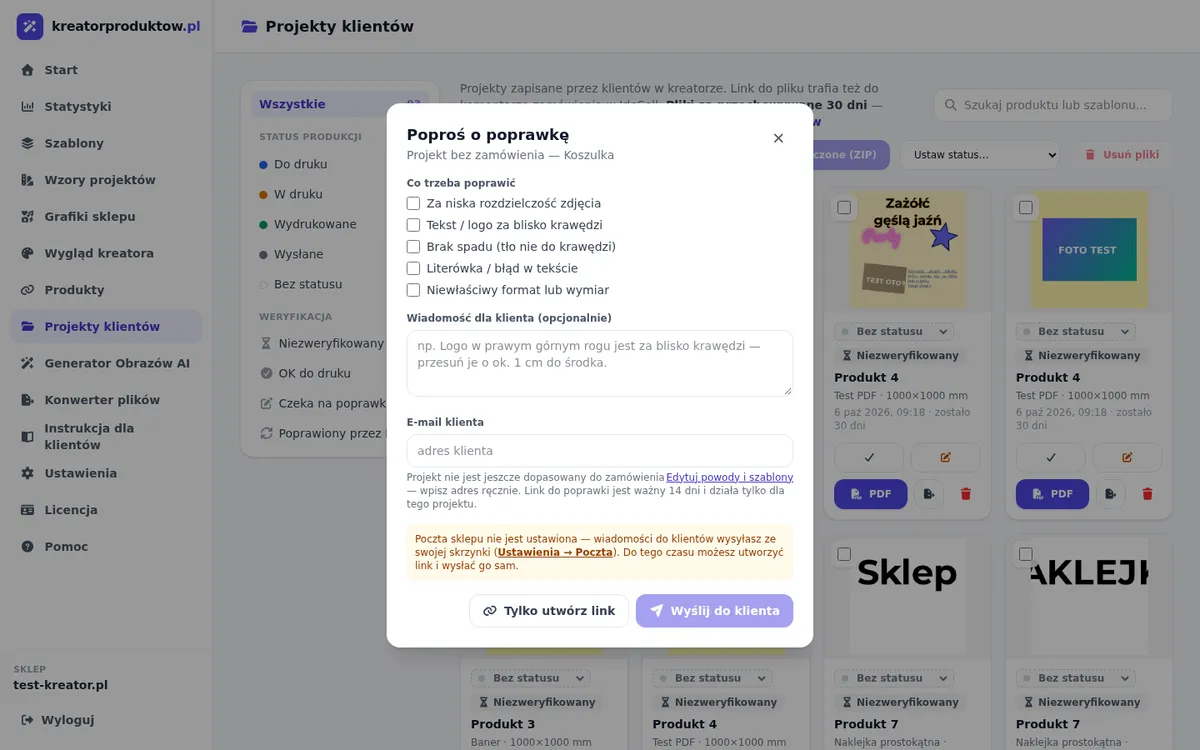
Review a design and request a correction in one click: pick a reason (e.g. no bleed, a typo) and the customer gets an e-mail with a link — they open their design in the designer, fix it and save. The corrected file replaces the old one under the same link in the order.
Send a customer a personal link to the designer with a chosen template, size, quantity and expiry — no product page needed. After saving: a thank-you page and an e-mail to the shop, or a redirect to the product with the design ready to add to the cart.
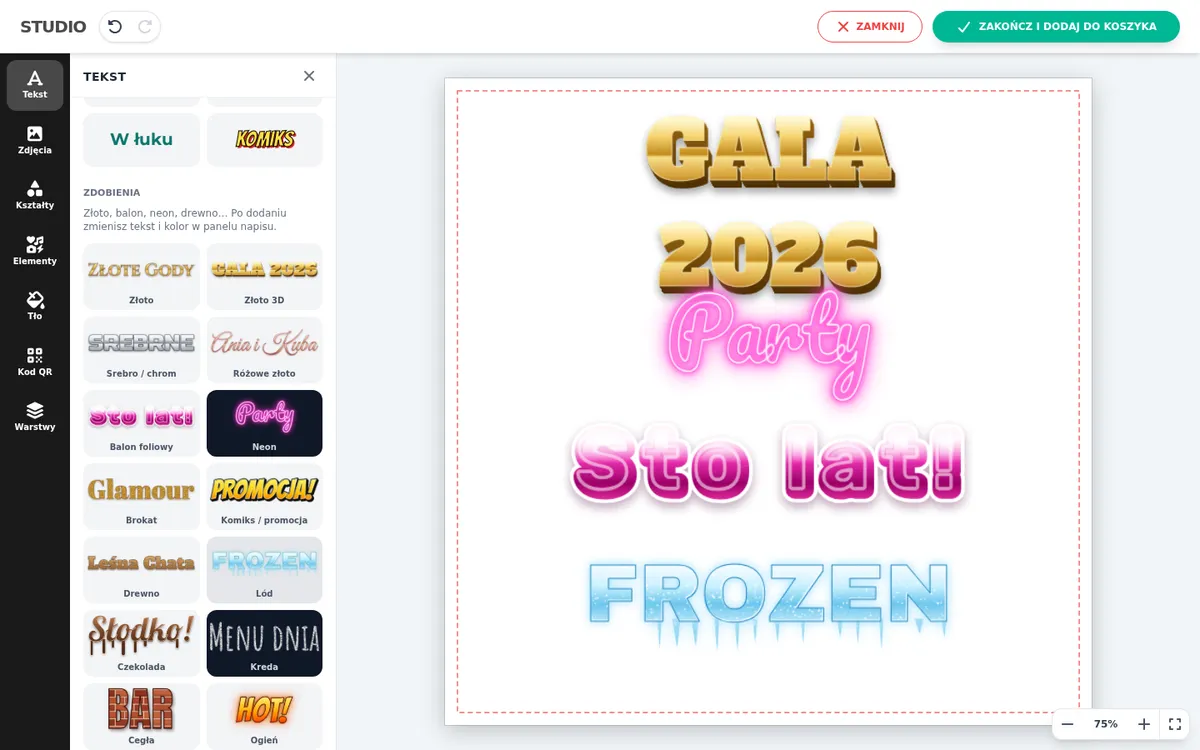
18 ready-made styles: gold, 3D gold, chrome, rose gold, foil balloon, neon, glitter, ice, wood, chocolate, fire and more — with colour variants. Printed exactly as on screen (as a 300 DPI image in the file, gold included, for RIP software).
The customer removes a photo background in one click, erases parts with an eraser or removes unwanted objects with the magic eraser — AI fills in the background. Edits are applied to the full-resolution original, plus filters, cropping and colour correction.
An intuitive designer anyone can use — no graphics or design skills needed. For those who want more: 38 fonts, text effects, shapes, photos with filters and cropping, layers and undo/redo.
Prepare ready-made designs in the panel (e.g. a birthday banner, a company sign) — the customer picks one, swaps the text and photo and orders. Faster for the customer, consistent with your offer.
The customer describes in words what they want on the product, and AI (OpenAI or Google Gemini — your choice) creates an image in the product's proportions. You decide whether to enable it and how many generations per day to allow.
Comfortable on desktop, tablet and phone: dragging, two-finger gestures, panels sliding up from the bottom. Large camera photos work smoothly.
A vector PDF in millimetres with bleed and a cut line (embedded fonts, full-resolution photos) or a 300 DPI PNG with transparency for prints. A warning when a photo's DPI is too low. In Premium: a PDF → PNG / TIFF converter (RGB or CMYK).
Multi-side products: a double-sided flyer, a T-shirt printed on the front, back and sleeve. The customer switches sides in the designer, and you get one PDF with all sides or a ZIP with a PNG for each side. Sides can be optional.
The customer sees the design on a product photo (T-shirt, mug), and you get just the print. Masks for flags, feather flags and unusual shapes.
With the White label add-on the designer runs on an address like designer.yourshop.com — customers see only your brand, including the file links in orders.
IdoSell, WooCommerce and PrestaShop (with a plugin / module — the button on the product page), Shoper, Base, Apilo and SellAsist in one panel. Automation scenarios: an order from Allegro, Amazon or a shop comes in — the customer gets a designer link in their language, after saving the file and status go back to the order, and the team gets notified.
Everyone logs in with their own e-mail and password, and you decide what they can access — e.g. the printer sees only Customer projects, without deleting, statistics or settings. Disable an account in one click. 3 accounts included.
No third-party tracking scripts in the designer and panel — fonts served from our own server. Customer files are deleted automatically — you set after how many days (1–30, or up to 90 / 365 with extra storage), separately for designs without and with an order. The customer sees this period in the designer.
Connect the systems you sell in — in any combination. In IdoSell, WooCommerce and PrestaShop shops (KreatorPRO plugin / module) and Shoper Premium (custom module) the customer designs on the product page, and for orders from Allegro, Amazon, Empik, Shoper or other shops (via Base.com — formerly BaseLinker, Apilo or directly) the designer sends the customer a link to design the ordered product automatically.
E.g. from Allegro into Base. A scenario “WHEN an order comes in, IF the source is Allegro and the status is Paid… DO…” decides what happens — also by country, amount, delivery or the word “urgent” in the notes.
An e-mail from your mailbox with a personal designer link — with the template and quantity from the order, in the customer's language (PL, EN, DE, CZ, SK, UA, RO). A reminder if they wait too long.
The same simple designer as on the product page. You get a print-ready file and the order number next to the design in the panel.
The file link goes to the order note, the status changes by itself both ways, and the print shop gets a notification — right away or during working hours.
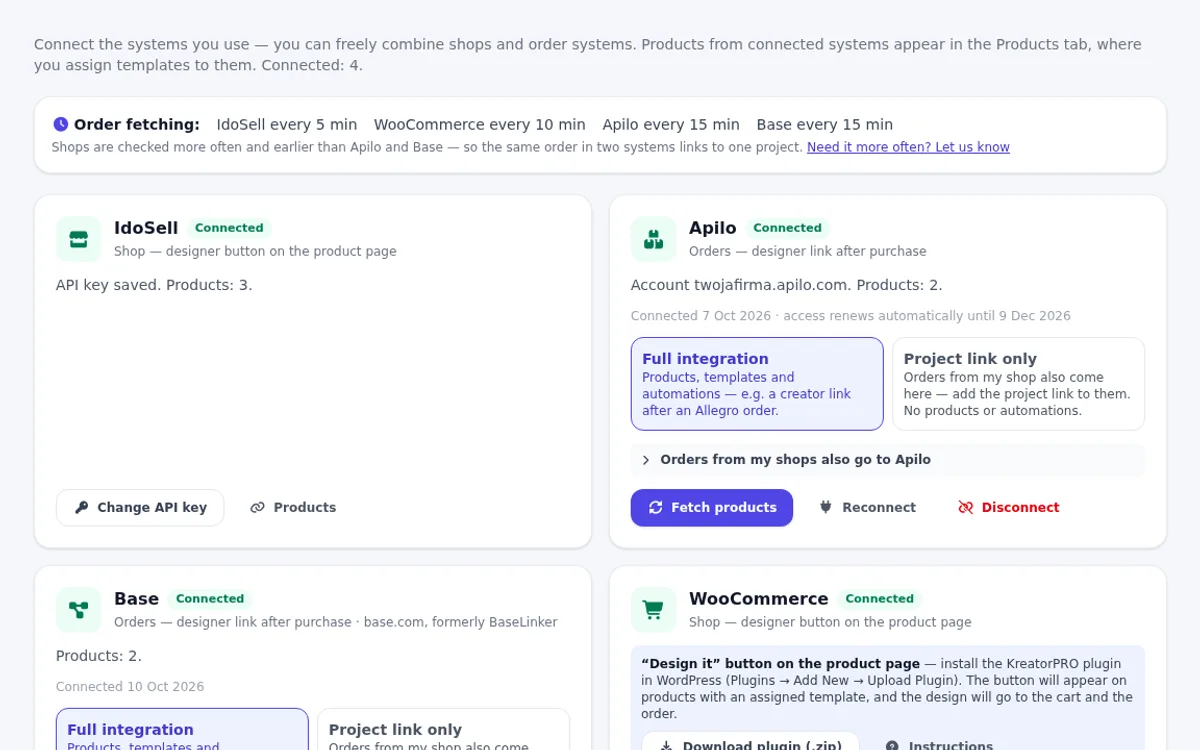
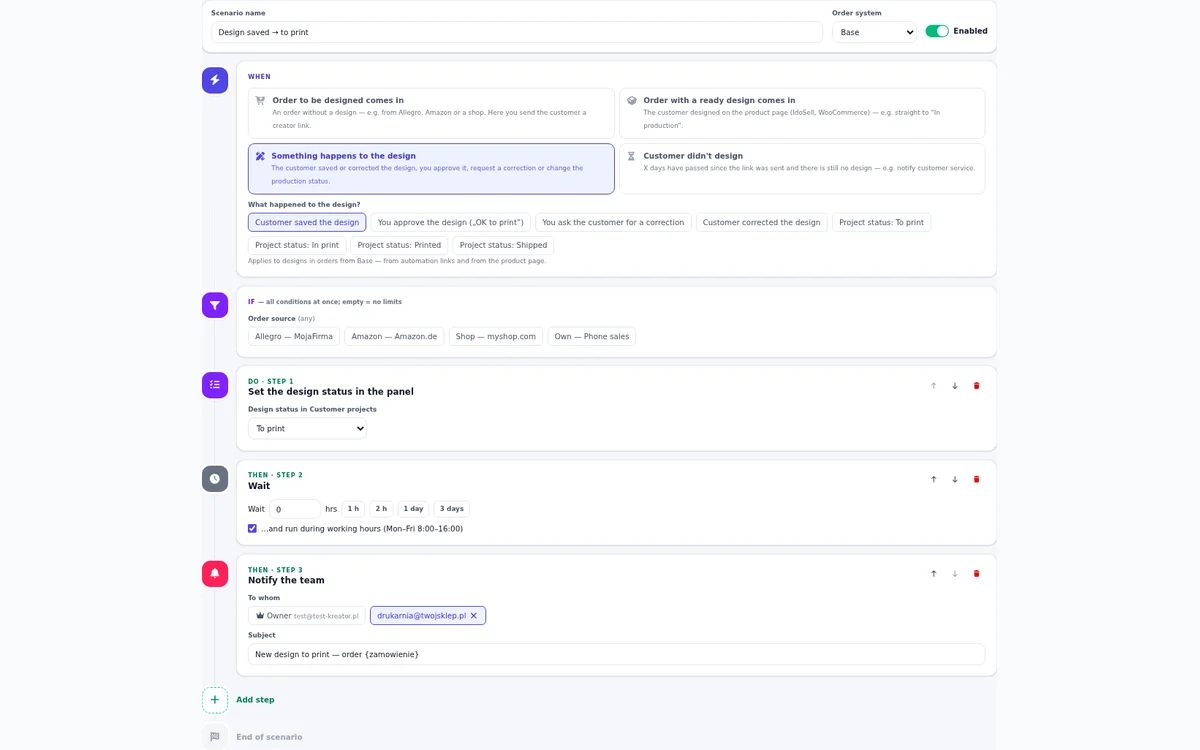
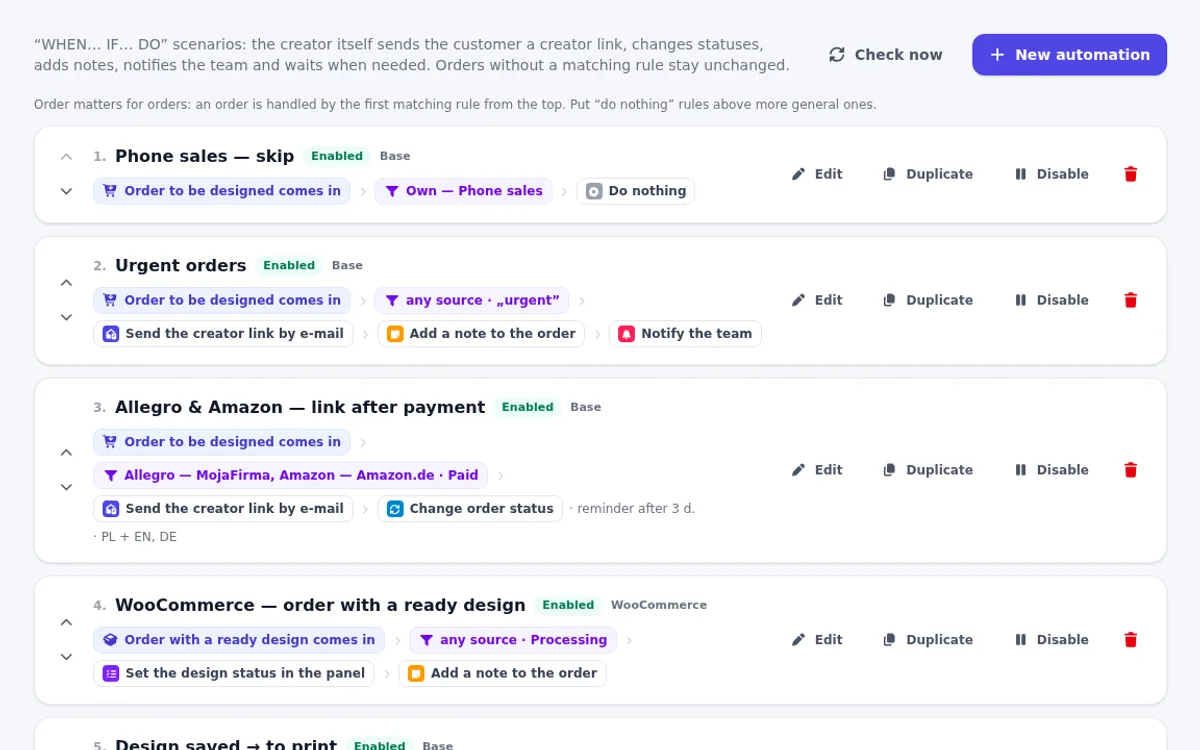
The same order in two systems (e.g. IdoSell and Apilo) is linked to one design — the customer won't get a second e-mail, and you find the design by both order numbers. Files stay with us — only a link goes to the order.
Screenshots of the designer and the shop panel (Polish interface) — how your customer and your print shop work.
Paste your IdoSell API key in the panel — the product list is fetched automatically.
Enter the size in mm and the bleed, choose the type (flat print, mockup, shape) and assign the template to products.
A "Design" button appears on the product page. The finished design goes to the cart with a link to the PDF.
Who is it for?
Large-format print shops, advertising agencies and shops selling personalized products: banners, posters, stickers, signs, T-shirts, flags.
A monthly subscription, no commission on orders and no limit on customer designs.
For shops with flat printing
249 PLN net / month
For print shops and agencies
349 PLN net / month
Add-on for Standard and Premium
The designer runs on an address in your shop's domain, e.g. designer.yourshop.com. Customers see only your brand, and the file links in orders point to your domain. Just add one DNS record — we set up the SSL certificate automatically.
+50 PLN
net / month
Add-on for Standard and Premium
3 accounts are included (yours too). Need more people in the panel — designers, printers, customer service? Add each extra account in License, no limit. Module permissions are set separately for every person.
+5 PLN
net / month per account
Add-on for Standard and Premium
The plan includes 1 shop (IdoSell, WooCommerce, PrestaShop or Shoper) and 1 order system (Apilo, Base or SellAsist). Selling on another platform too, or want a second system? Add each one in License.
+39 PLN
net / month per system
Net prices in PLN; VAT is added according to the applicable rules. Start with 30 days free, no card required. Then you pay in advance for the chosen period by bank transfer based on a pro forma invoice — no automatic renewal. 5% off for 6 months, 10% off for 12 months.
kreatorproduktow.pl is an online product personalization designer for e-commerce shops on the IdoSell platform and for sellers using WooCommerce, PrestaShop, Shoper, Base and Apilo (orders from Allegro, Amazon and other marketplaces). The customer designs the product right on the product page or after the purchase, from a link in an e-mail — adding text, a photo or choosing a ready-made template — and the shop receives a print-ready file with the order: a vector PDF in millimetres with bleed or a PNG with transparency. The service is made by the Polish company PanSkull.
The customer designs an advertising banner or poster in any size — also in the size chosen in the IdoSell product parameters. A file with bleed, ready for large-format printing.
Contour-cut, round, rectangular or library-shaped stickers — single, on a sheet or on a roll, with an automatic cut line (CutContour) for the plotter.
The design is shown on a product photo (T-shirt, mug, bag mockup) — also with several print areas: front, back, sleeve. Only the print itself goes to production, as a PNG with transparency.
Large formats from customers' photos — the designer checks the resolution (DPI) and warns against a blurry print.
Unusual shapes with a mask — the customer sees the product outline, and the print file is cut to the shape with a margin.
Templates prepared by the shop (e.g. a birthday banner, a company sign) — the customer only swaps the text and photo.
It is a tool embedded in an online shop where the customer designs a personalized product themselves — e.g. a banner, a sticker or a T-shirt — by adding text, photos and graphics. kreatorproduktow.pl works on the product page of IdoSell shops and turns every design into a print-ready file (PDF or PNG) that goes into the order.
The Standard plan costs 249 PLN net per month (up to 500 products, 10 GB of files) and Premium 349 PLN net per month (up to 5000 products, 30 GB, PDF → PNG / TIFF converter). Extra storage can be added at any time: +50 GB for 30 PLN or +100 GB for 49 PLN net per month. Paying for 6 months gives 5% off, for 12 months — 10%. We take no commission on orders. You start with 30 days free.
Banners, posters, flyers, stickers (contour-cut, on a sheet or on a roll), signs, wall murals, T-shirts, mugs and other gadgets on a mockup, as well as flags and feather flags with unusual shapes. For each product you set a template in the panel with the size in millimetres and the bleed.
Yes. In the template you set the sides, e.g. "Front" and "Back" of a flyer or "Front", "Back" and "Sleeve" of a T-shirt — each mockup side has its own product photo and print area. The customer switches sides in the designer and may leave a side marked as optional empty. You get one PDF with all sides or a ZIP with a PNG for each side, and the order comment shows which sides the customer designed. You set the surcharge for extra sides in IdoSell.
Yes. The designer is adapted to desktop, tablet and phone, including iPhone with Safari: finger dragging, two-finger gestures and panels sliding up from the bottom. Large camera photos work smoothly, because editing uses a lighter copy and printing uses the original.
Yes. The designer opens in a window over the product page and does not depend on the shop's look. The button appears above "Add to cart" and you can match its colours in the panel.
As a vector PDF in the product's dimensions (in millimetres) with bleed and a marked cut line — or a 300 DPI PNG with transparency for prints. The link to the file and preview goes into the order comment, and you see all designs in the panel.
No. The designer is simple and intuitive — the customer types text, adds a photo from their phone or computer and moves elements with a finger or a mouse. They can also start from a ready-made template prepared by the shop and just swap the content. Before saving, the designer warns about a photo of too low quality.
The designer your customers use and the shop panel are currently in Polish. If you need them in another language for your shop, write to us.
Yes. In the shop panel, under "Design templates", you design ready-made templates for each product template (e.g. a birthday banner, a sign with a logo). The customer sees them in the designer under "Templates", picks one and adapts it.
Yes. In the Integrations tab you connect IdoSell, WooCommerce, PrestaShop, Shoper, Base (base.com, formerly BaseLinker), Apilo and SellAsist with an API key — several at once, too. For orders from these systems (e.g. from Allegro or Amazon via Base) an automation e-mails the customer a designer link, and after saving the file link goes to the order note and the status changes by itself. Automations need only an API key; the “Design it” button on the WooCommerce and PrestaShop product page comes with our plugin / module.
Yes, if you handle Allegro orders in Base or Apilo. Create an account for your company domain, connect the system in Integrations, assign templates to products and turn on a ready-made scenario — after the order is paid, the customer gets a link to design the product, with a reminder if they wait too long.
Yes — in the "AI Generator" tab the customer describes the image in words, chooses a style (photo, illustration, watercolour, flat graphic, 3D render), and AI creates it in the product's proportions and adds it to the design right away. You enable the generator in the shop panel: choose the engine (OpenAI or Google Gemini) and the model, paste your own API key and decide whether there is a daily generation limit. You pay the AI provider directly for images, with no markup from us. Available in both plans.
Yes, in the Premium plan. The converter in the panel turns a customer's design or your own PDF file into PNG or TIFF — with a white or transparent background, in RGB or CMYK, with bleed or trimmed to the cut line, at the chosen resolution (DPI) or size. Multi-page files are downloaded as a ZIP.
Yes — with the White label add-on (+50 PLN net / month) the designer runs on an address in your shop's domain, e.g. designer.yourshop.com. Customers and the file links in orders then do not show the kreatorproduktow.pl address. Just add one DNS record — we set up the SSL certificate automatically.
Yes. Everyone logs in with their own e-mail and password, and the owner chooses which modules they can access — e.g. the printer sees only Customer projects and can't delete them, while the designer has templates and design templates. 3 accounts are included (the owner too), each additional one costs 5 PLN net per month.
The designer calculates the photo's print resolution (DPI) from the product dimensions and warns the customer when the print may be blurry — before they place the order.
As long as you set in the panel (Settings → Projects): 1 to 30 days (with extra storage +50 GB — up to 90 days, +100 GB — up to 365 days), separately for designs without an order (counted from saving) and with a placed order (from the order date). The customer sees this period in the designer. During this time, download the file for production — from the order comment or from the "Customer projects" panel.
No. You paste the API key, create templates in the panel and add one line of code in the shop's HTML/JS add-ons. In the Premium plan we help with the setup.
Yes — try the demo on this page and download the generated print file, then sign up: you get 30 days free to launch the designer in your own shop. Nothing is charged automatically — after the trial you choose a plan and pay by bank transfer.
Tell us which product you want to personalize — we will help prepare the templates. Prefer to do it yourself? Sign up and test 30 days free.